
Shizuku APK (Latest)
Jun 6, 2017
2.45 MB
13.5.4.r1049.0e53409
7.0
10,000,000+
Images
Description
Shizuku APK – Unlock Advanced Android Features Without Root
Android is powerful, but many of its best system-level features are locked behind root access. For most users, rooting a device is risky, time-consuming, and can break apps or updates. This is where Shizuku APK completely changes the game. It allows Android users to access advanced system APIs without rooting their device, opening the door to powerful customization, automation, and privacy controls.
If you’ve ever wanted apps to do more on your phone without compromising security Shizuku APK is the solution. In this detailed guide on apkmodz.org, we’ll explore everything you need to know about Shizuku, its features, use cases, installation process, and why it’s one of the most essential tools for power users.
What Is Shizuku APK?
Shizuku APK is a system-bridge application that enables other Android apps to access privileged system APIs using ADB (Android Debug Bridge) or root—without directly requiring root permissions for the apps themselves.
In simple terms, Shizuku acts as a secure middle layer between Android system services and third-party apps. Once activated, supported Shizuku apps can perform advanced tasks like modifying system settings, controlling permissions, managing apps deeply, and automating actions that are normally restricted.
Unlike traditional root solutions, Shizuku Android keeps your device safe, update-friendly, and compatible with most banking and streaming apps.
Key Features of Shizuku APK
🔹 System API Access Without Root
Shizuku allows apps to use hidden or restricted Android APIs safely.
Use case:
Grant or revoke app permissions in bulk without manually opening each app’s settings.
🔹 ADB-Based Activation (Wireless Support)
No USB cable required after initial setup on modern Android versions.
Use case:
Activate Shizuku wirelessly and control your device remotely with automation tools.
🔹 Works With Multiple Shizuku Apps
Many advanced Android tools are built specifically to work with Shizuku.
Use case:
Use app managers, debloaters, permission editors, and automation apps seamlessly.
🔹 No System Modification
Does not alter system partitions or bootloader.
Use case:
Safe for daily use and OTA updates—no risk of soft bricks.
🔹 Secure & Permission-Based
Only apps you approve can use Shizuku’s system access.
Use case:
Maintain privacy while still enjoying power-user features.
What’s New in the Latest Version of Shizuku APK
The latest version of Shizuku APK brings noticeable improvements in stability and compatibility:
- Improved support for newer Android versions
- Faster service startup and reduced crashes
- Better wireless debugging reliability
- Enhanced compatibility with popular Shizuku apps
- UI refinements for easier setup and monitoring
These updates make Shizuku app smoother, more reliable, and beginner-friendly.
How Shizuku APK Works (Functionality Breakdown)
Shizuku works by starting a background service that has permission to call system-level APIs. This service is launched using:
- ADB (recommended for non-root users)
- Root access (optional)
Once running, supported apps can connect to Shizuku and request system actions. Shizuku then executes these actions securely on their behalf.
Think of it as a trusted system assistant that only works when you explicitly allow it.
Benefits & Advantages Over Similar Android Tools
✅ No Root Required
Unlike Magisk modules or system mods, Shizuku keeps your device unrooted.
✅ Safer Than Traditional Mods
No bootloader unlocking or flashing involved.
✅ Future-Proof
Works across Android versions with minimal compatibility issues.
✅ Expands App Capabilities
Turns supported apps into near-root-level tools.
✅ Lightweight & Efficient
Minimal battery and resource usage.
For users who want power without risk, Shizuku APK download is a must-have.
Pros and Cons of Shizuku APK
👍 Pros
- Enables advanced features without root
- Secure and permission-controlled
- Works with many powerful Shizuku apps
- No permanent system changes
- OTA updates remain intact
👎 Cons
- Requires initial ADB setup
- Needs reactivation after reboot (ADB mode)
- Only works with compatible apps
How to Install Shizuku APK (Safe APK Guide)
Follow these steps to install and activate Shizuku APK safely:
Step 1: Download Shizuku APK
Get the latest version from a trusted source like apkmodz.org.
Step 2: Install the APK
- Enable Install Unknown Apps in settings
- Install the Shizuku APK normally
Step 3: Enable Developer Options
- Go to Settings > About Phone
- Tap Build Number 7 times
Step 4: Activate Shizuku
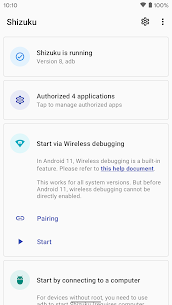
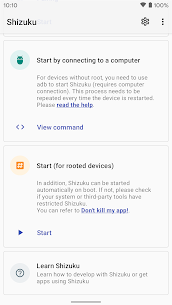
- Open Shizuku app
- Choose Wireless Debugging or ADB method
- Follow on-screen instructions
Step 5: Grant Access to Supported Apps
- Open any supported Shizuku app
- Approve access when prompted
That’s it you’re ready to unlock advanced Android features.
Compatibility & System Requirements
Before installing Shizuku Android, ensure your device meets these requirements:
- Android 8.0 (Oreo) or higher
- Developer Options enabled
- Wireless debugging or ADB access
- No root required (optional)
Shizuku works smoothly on most brands including Samsung, Xiaomi, OnePlus, Realme, Pixel, and more.
FAQs About Shizuku APK
What is Shizuku APK used for?
Shizuku APK allows apps to access advanced Android system APIs without requiring root.
Is Shizuku safe to use?
Yes, Shizuku is secure and only grants access to apps you approve.
Does Shizuku require root?
No, Shizuku works without root using ADB or wireless debugging.
Which apps support Shizuku?
Many app managers, debloaters, permission tools, and automation apps support Shizuku.
Does Shizuku work after reboot?
In ADB mode, Shizuku needs to be reactivated after reboot. Root users get persistent access.
Can beginners use Shizuku?
Yes. The app provides step-by-step guidance, making it beginner-friendly.
What's new
Please see full changelog at GitHub (RikkaApps/Shizuku).
Download links
How to install Shizuku APK (Latest) APK?
1. Tap the downloaded Shizuku APK (Latest) APK file.
2. Touch install.
3. Follow the steps on the screen.